
 Radiant Photo
New
Radiant Raw
A separate app with its own license for developing raw files, with a filmstrip for a whole shoot, Selects, sorting, sync and export.
What’s new · Radiant Photo 2.5
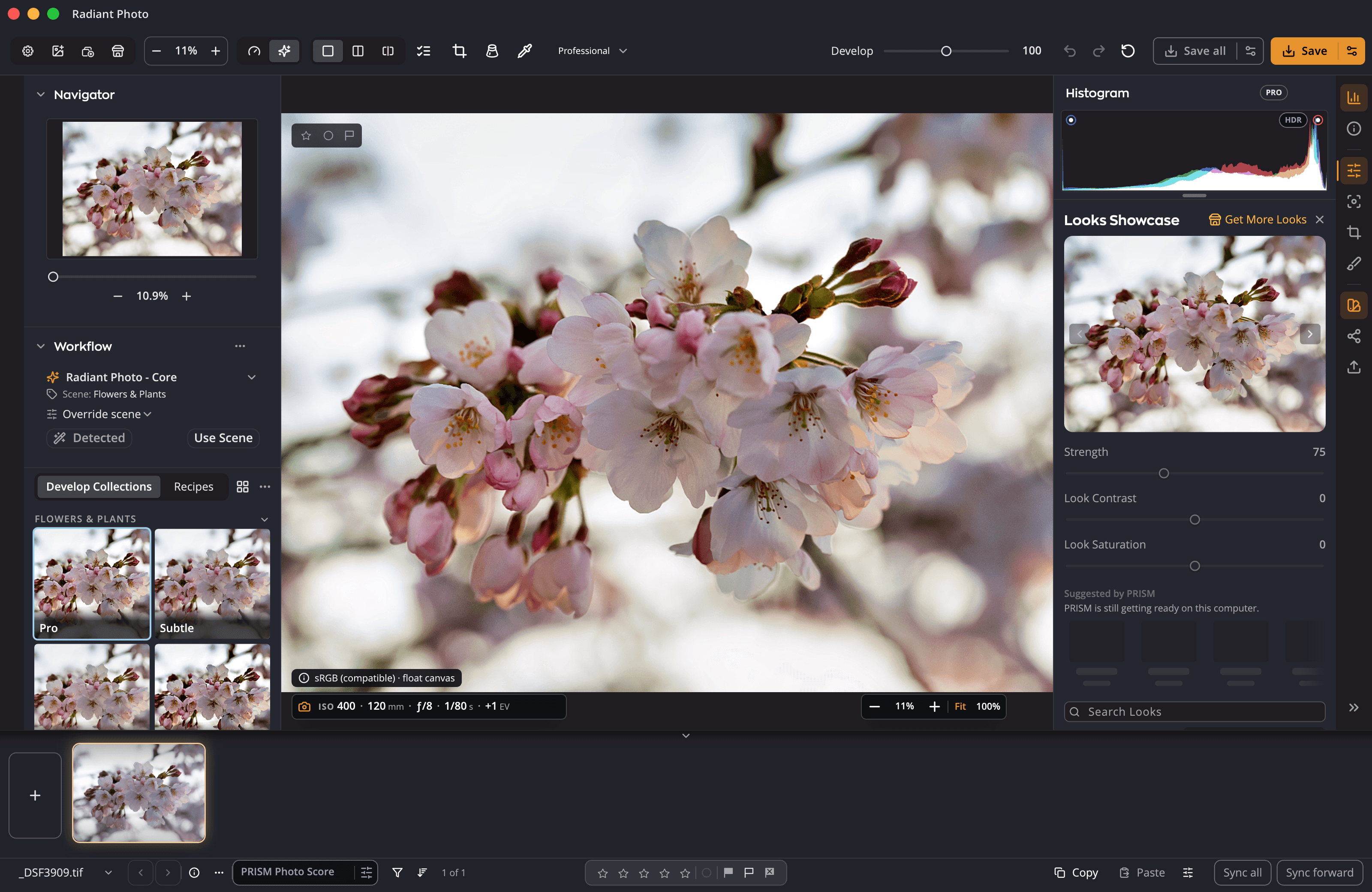
A raw developer of its own in Radiant Raw. Texture, Clarity, Atmosphere, Levels and Curves. Color Wheels. A Look library you can search and preview with the pointer. Here is what changed, and what comes with you when you move.
Raw files
Radiant Photo 2 had no develop controls of its own: its manual sent you to your raw editor first. Now Radiant Raw develops your raw files, and Radiant Photo hands them over and back.
New
A separate app with its own license for developing raw files, with a filmstrip for a whole shoot, Selects, sorting, sync and export.
New
White balance with an eyedropper, Tone, Levels, Curves, Vibrance, Selective Color, Color Wheels, Clarity, sharpening and noise reduction.
New
Once you allow the free download, Radiant Raw matches a profile to your lens and corrects distortion, color fringing and vignetting.
New
Auto, Level, Vertical, Full and Guided in Radiant Raw, and Vertical and Horizontal sliders in Radiant Photo.
New
Edit the light above white on an HDR display, and export HDR JPEGs that show it, on Mac and Windows.
New
Twelve built-in develop recipes, eight of them marked Lab Tools while they are still being refined, and your own to save, import and export.
Improved
Radiant Photo develops a raw file as it opens: automatically, with a recipe of your choice, or after asking. With Radiant Raw activated, it can send the file there instead.
New
Re-develop Raw… sends a raw photo from Radiant Photo to Radiant Raw and brings it back with your Radiant Photo adjustments kept.
Editing
New
Bring out fine detail, add midtone punch, and cut through haze or add some.
New
Per-channel Levels with eyedroppers and presets, point and parametric Curves, and curve files you import. Radiant Photo 2 had a white and a black point.
New
Suggested framings, each with its reason, Compare Crops, a one-click level to the photo’s strongest line, and Turn Right Side Up.
New
Heal or Clone anywhere in the photo, a pin for every fix, and Auto Source to pick a clean source for a Heal. Radiant Photo 2 removed blemishes on skin only.
New
The Magnifier snaps to the eye your camera focused on. A focus mask lights up what is sharp, and a sharpness score rates the frame.
New
One of 11 film stocks or a plain subtle, medium or heavy grain, with its amount, size and roughness.
Improved
Masking keeps smooth areas smooth; hold Option or Alt as you drag to see where it sharpens. Radiant Photo 2 had a Threshold control.
Improved
A manual Noise Reduction panel with presets you save, beside Detailed Scan. Radiant Photo 2 had Strength and Details with Detailed Scan.
Improved
16 skin shades and 36 blush colors, where Radiant Photo 2 had 5 and 12, or mix your own.
Improved
A histogram with a log scale and a gamut warning, a waveform, a parade and a vectorscope with a skin line. Radiant Photo 2 had a histogram.
Improved
Before/After and Split, now joined by A ↔ B between two photos.
Improved
Copy Settings with a checklist of what to copy, Sync to Selected, and presets for many more tools.
Color
Radiant Photo 2 gave you Looks, Selective Color, Black and White and Split Color Warmth. 2.5 adds the hands-on tools a colorist reaches for first.
New
Shadows, Midtones and Highlights, each wheel with its own luminance, and each side of the Graduated Filter with a grade of its own. Radiant Photo 2’s filter had Temperature and Tint.
New
Click a neutral point to clear a cast, or let Auto Color set color and contrast with one of four methods.
New
Pin up to ten points on the photo and read each one live.
New
Edit in Display P3, Adobe RGB (1998) or ProPhoto RGB, so wide-gamut photos keep their color while you work.
Improved
Color, B&W and Invert, and drag on the photo to lighten or darken a color in the mix. Radiant Photo 2 had six swatches and eyedroppers.
Improved
Eight hue bands: click the photo to pick one, drag to change it, and turn on Isolate to see where it acts. Radiant Photo 2 had six swatches and eyedroppers.
Looks
Radiant Photo 2 kept Looks in groups you opened one by one. Now they live in the Look Browser, and the Looks Showcase shows them large on your own photo.
New
Find any Look by name, and the last twelve you used this session wait at the top.
New
Point at a Look to see it on your whole photo, and click to keep it. The Looks Showcase steps through them large.
New
Up to nine Looks picked for the photo, with Radiant Flow on the same computer and PRISM Photo Score on.
Improved
Your favorite Looks stay favorites, and Radiant Photo and Radiant Raw share one list.
Improved
A color Look starts at 75% and a black-and-white Look at 100%, and switching Looks keeps the strength you set. Radiant Photo 2 went to 100%.
Improved
Eight file types, one more than Radiant Photo 2: drop .cube files onto the Look Browser, rename them, and group them into your own collections.
At a glance
| Radiant Photo 2 | Radiant Photo 2.5 | |
|---|---|---|
| Raw files | No develop controls of its own | Radiant Raw, a raw developer of its own, and four ways to open a raw file in Radiant Photo |
| Lens corrections | In your raw editor | In Radiant Raw, profiles matched to your lens |
| Perspective | In your raw editor | Auto, Level, Vertical, Full and Guided in Radiant Raw; Vertical and Horizontal in Radiant Photo |
| HDR | — | HDR editing, and HDR JPEG export on Mac and Windows |
| Texture, Clarity, Atmosphere | — | Yes |
| Levels and Curves | White and black point | Per-channel Levels; point and parametric Curves |
| Crop | Ratio and straighten by hand | Auto Crop with its reasons, Auto Level, crop sync |
| Spot Removal | Blemishes on skin, automatically | Heal or Clone anywhere, Auto Source for a Heal |
| Skin shades and blush colors | 5 and 12 | 16 and 36 |
| Scopes | Histogram | Histogram, waveform, parade, vectorscope with a skin line |
| Color Wheels | — | Shadows, Midtones, Highlights, in the Graduated Filter too |
| Selective Color | Six swatches and eyedroppers | Eight hue bands, picked and changed on the photo |
| Finding a Look | Groups you open one by one | Look Browser with search, favorites and preview, and the Looks Showcase |
| Look suggestions | Workflows, by scene | Workflows, plus up to nine Looks suggested by PRISM (with Radiant Flow) |
| Look Strength | 0 to 100% | 0 to 200%, kept when you switch Looks |
| Your own LUTs | Load Lookup Table, seven file types | Eight file types, drag and drop, your own collections |
| Bringing your work | — | File › Import from Radiant Photo 2… |
Before you move
File › Import from Radiant Photo 2… brings your develop collections, your recipes, loaded LUTs, tool and crop presets, per-scene defaults, favorites and settings. You see the list first, and nothing is copied until you click Import. Restore Purchases brings back the Look collections you bought.
Radiant Photo 2.5 needs macOS 14 or later, on Apple silicon or Intel, or Windows 10 (22H2) or 11, 64-bit. On an older Mac, keep Radiant Photo 2: 2.5 installs beside it.
Activating Radiant Photo doesn’t activate Radiant Raw. Plans that include both say so on Pricing.
Auto Red-Eye Reduction is not in Radiant Photo 2.5.
One workflow
Try it free on Mac or Windows, and bring your Radiant Photo 2 work along in one step.


