
PRISM Photo Score
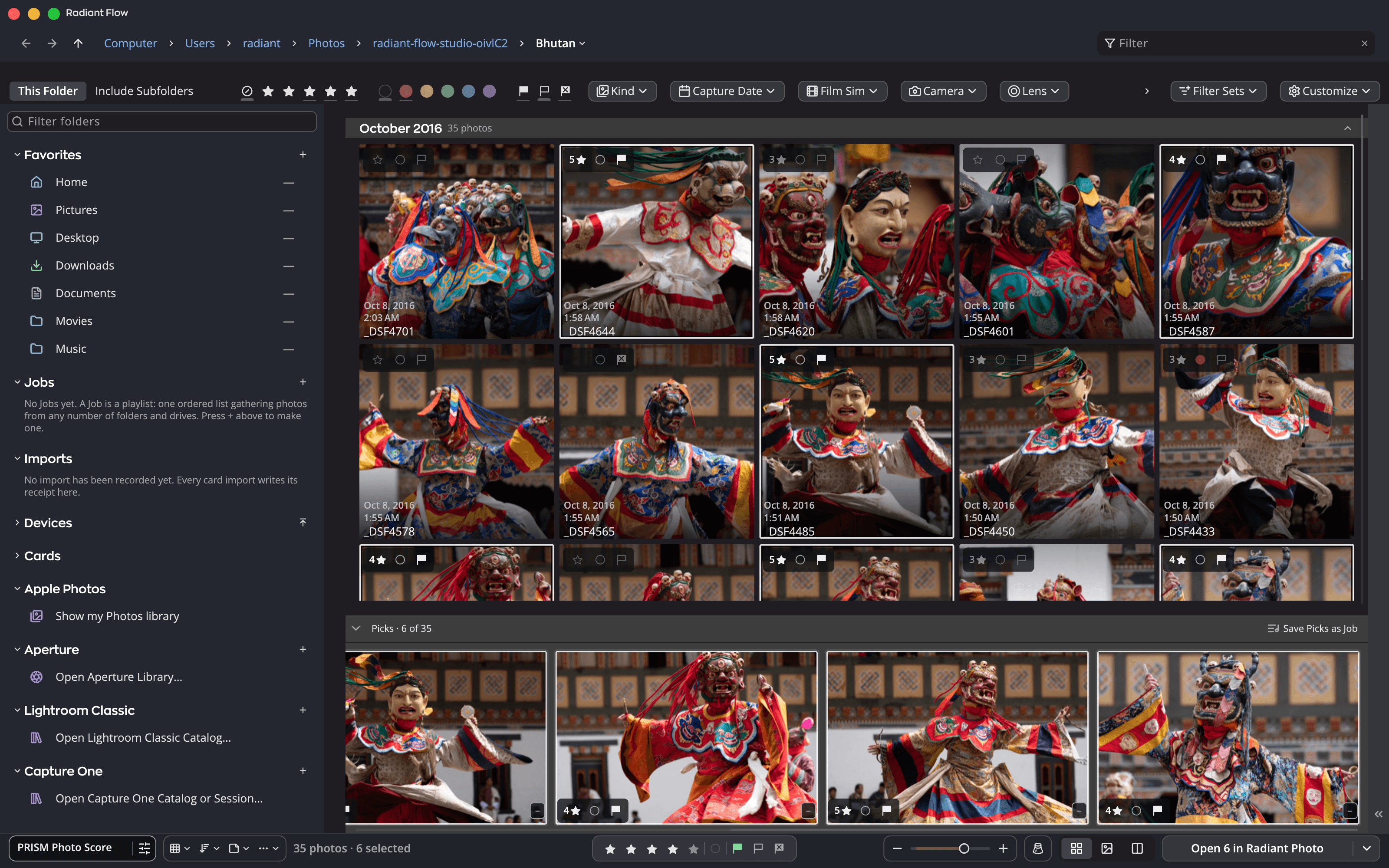
A 0 to 100 score with Keep, Review and Reject bands, built from things you can see: open eyes, sharp faces, good exposure, a level horizon.
PRISM · Photo intelligence
PRISM reads your photos and turns what it sees into help you can use: a PRISM Photo Score that finds your keepers, a suggested star rating, Looks that suit the shot, and keywords and a caption ready to save. All of it runs privately on your own Mac or PC.
In Radiant Flow
 Radiant Raw
 Radiant Photo
What PRISM does
PRISM stands for Perceptual Routing via Instrument-Split Matching: it looks at what the picture shows and how it is lit, then routes that understanding to the tools that need it.
A 0 to 100 score with Keep, Review and Reject bands, built from things you can see: open eyes, sharp faces, good exposure, a level horizon.
Every scored photo gets a suggested star rating. Accept it with one click, or let auto-rate apply it. It never overwrites your stars on its own.
Up to nine Looks chosen for this photo, in a row of their own. Nothing is applied until you pick one.
Up to eight keywords and a short caption, written to your files only when you press Save.
Try the band lines
Keep, Review and Reject are two lines on one scale, and the lines are yours to set. Move one in any app and all three relabel at once, with no re-scoring.
 93Keep
 88Keep
 86Keep
 77Review
 66Review
 58Review
 44Review
 38Reject
 14Reject
 9Reject
Keep 3Review 4Reject 3
Try it: the labels move, the scores do not. That is exactly how the setting behaves across the three apps.
Local AI
PRISM’s brain is SigLIP 2, an open-source vision model, running on your own computer’s processor. It turns each photo into a compact description of what is in it, and PRISM’s own small, fast models do the rest.
It works in the background, scoring a folder at a time while you keep working. Radiant Flow fetches the model once (about 370 MB), checks its fingerprint and keeps it; PRISM needs no internet to read a photo. Small on-device face models find faces and read whether eyes are open, to judge portraits the way you would. The same models and features on Mac and Windows.
PRISM never sends your photos, thumbnails, scores or descriptions of them to us or anyone else.
PRISM finds faces to judge focus, eyes and exposure. It never tries to recognize who anyone is.
The only learning is the kind you ask for: "Set from my rated photos" proposes score settings from your own ratings, on your computer, applied only when you click Apply.
PRISM Photo Score
PRISM Photo Score judges each picture on the things photographers actually check, and shows its work. You always see which signal lifted a photo up or held it back.
Eyes open and facing the camera, across every face in a group, plus sharpness and exposure on the main face.
Sharpness where the subject is, exposure, noise and, for landscapes, a level horizon.
Portrait, Newborn, Landscape, Night, Animals, Flowers, Black & White, General and No face. PRISM recognizes the scene and picks the right one, so a city at night is judged as a night shot.
Shots fired in quick succession, never more than two seconds apart, are grouped, and the strongest frame is marked. On photos without people, "missed focus" or "motion blur" appears as a hint, never held against the score.
Across the three apps
Every folder you open is scored, unless you choose Don’t Score This Folder; camera cards only when you ask. Each frame gets a score and a band. A badge marks the folder; a chip marks each photo. Suggested keywords and a caption wait in the Metadata panel.
A batch opened on its own still shows you the keepers on its filmstrip, with face boxes and eyes open or closed.
The scores show in Review Photos, and PRISM suggests a develop collection and Looks for the scene, applied only when you press Apply.
Move a band line in any app and every app relabels at once, with no re-scoring. Stars PRISM suggested are drawn hollow; stars you set are filled.
Questions
PRISM computes its scores in Radiant Flow, which is free. Radiant Raw and Radiant Photo read them, and Radiant Photo asks Flow for faces only while PRISM Photo Score is on.
No. Scoring, scene recognition, Looks matching, keywords and captions are all computed on your Mac or PC. The only download is the model, once.
Only when you say so. Accepted ratings and saved keywords go into standard XMP that Lightroom and other tools read. PRISM also writes its findings into an .xmp sidecar next to each photo it scores, so they travel with the photo.
Key benefits
Every photo, scored. Every line, yours.
Many frames. One cover.
It suggests. You decide.
Every recipe. One panel.
One press for a good framing. Every other one in view.
Frame it your way, with good framings to choose from.
Straighten the lines. See every way first.
Smooth the grain. Keep the edges.
Crisp detail, smooth backgrounds.
Straight lines, even corners, clean edges.
Read the light. Without looking away.
Brush over a spot. Radiant Photo picks the clean source.
Point at a Look. See it on your photo.
Design it once. Sign every output.
Done keeps your work. Export writes the files.
One workflow
PRISM scores your first folder on your own computer. Nothing leaves it.


