
Radiant Raw
On the Focus page with the Magnifier, Focus Points, Focus Peaking and Sharpening, and in the Edit page’s Detail section, with the same values in both places.
Noise Reduction · Radiant Raw and Radiant Photo
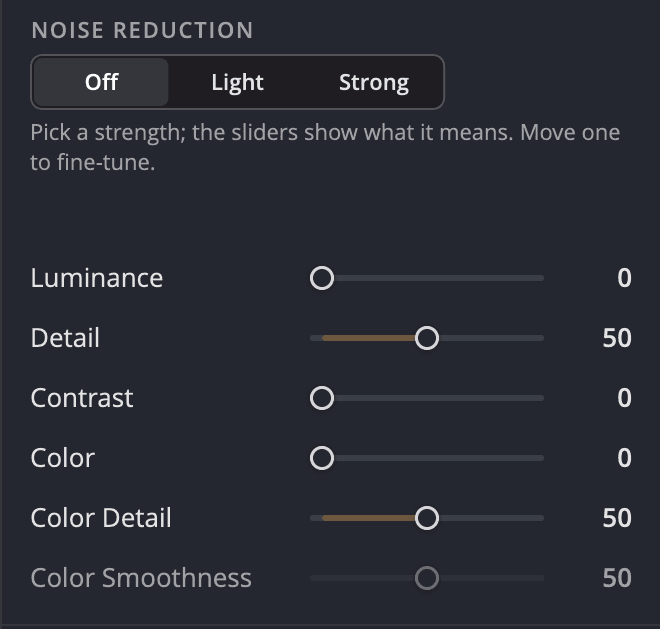
Shot at a high ISO? Radiant Raw smooths the grain and the color speckles, and gives each its own controls: Luminance, Detail and Contrast for the brightness grain; Color, Color Detail and Color Smoothness for the speckles. An edge-preserving filter on your GPU does the work.
Why you will like it
An edge-preserving filter smooths noise while it respects the edges in your photo.
Raise Detail to keep fine texture, and raise Color Detail to keep color edges crisp.
Pick Off, Light or Strong, and the six sliders show what it means. Move any one to fine-tune; Use basic takes you back, and each switch is one undo step.
The Magnifier names the slider you are dragging: "Showing: Noise Reduction · Luminance".
Color Smoothness grays out while Color is 0, because it has no effect then.
Grain and color, handled apart
Luminance, Detail and Contrast work on the brightness grain. Color, Color Detail and Color Smoothness work on the color speckles. Raise Detail to keep fine texture, and Color Detail to keep color edges crisp. Try them: the swatches are a drawing of the idea.
Where to find it
On the Focus page with the Magnifier, Focus Points, Focus Peaking and Sharpening, and in the Edit page’s Detail section, with the same values in both places.
In the Details tools next to Sharpening, as before, and now also on the new Focus page.
Radiant Raw’s six-slider noise reduction is new to the family, and the Focus page is new in both apps.
Key benefits


Crisp detail, smooth backgrounds.
Straight lines, even corners, clean edges.
Read the light. Without looking away.
Brush over a spot. Radiant Photo picks the clean source.
Point at a Look. See it on your photo.

Design it once. Sign every output.
Done keeps your work. Export writes the files.
Every photo, understood. Right on your computer.
Every photo, scored. Every line, yours.
Many frames. One cover.
It suggests. You decide.
Every recipe. One panel.
One press for a good framing. Every other one in view.
Frame it your way, with good framings to choose from.
Straighten the lines. See every way first.
One workflow
Radiant Raw develops the capture itself, so the noise reduction works on the real grain.


