
Red-eye
Red-eye removes the red glow that flash can leave in eyes. You place a point on each eye, and Radiant Raw does the rest.
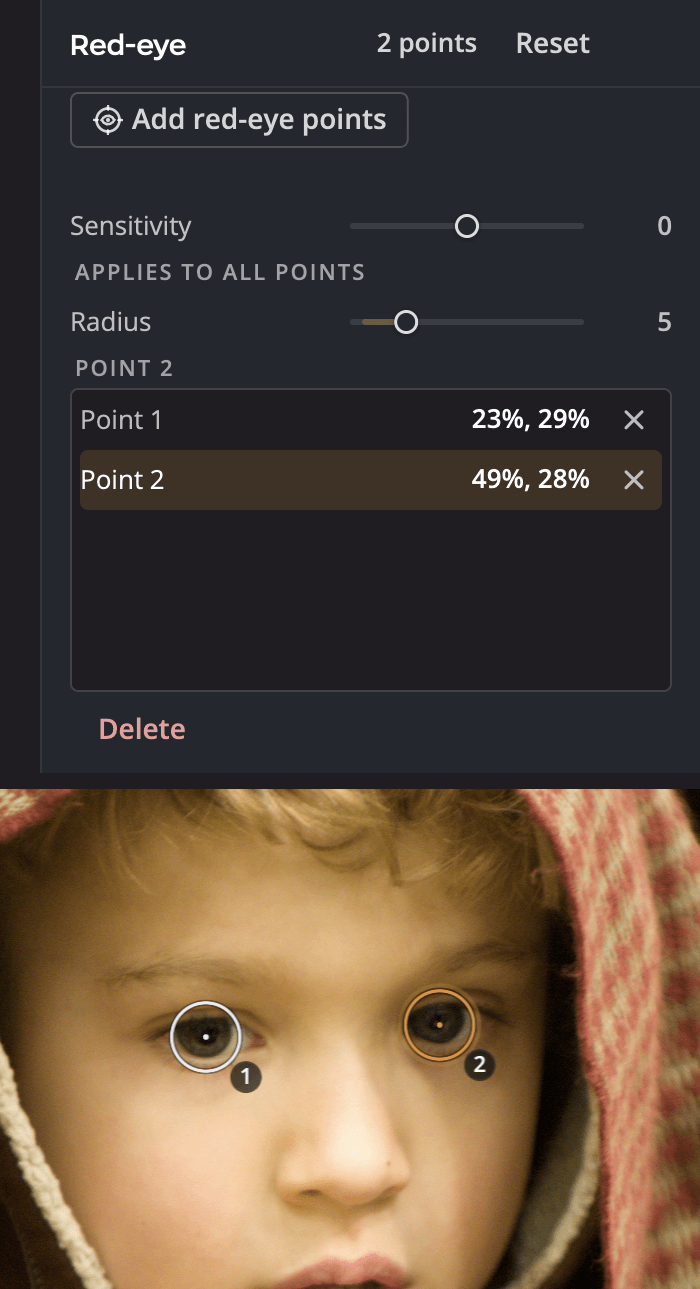
| # | Control | What it does |
|---|---|---|
| 1 | Add red-eye points | Starts placing points. Click each red eye to place one. |
| 2 | Sensitivity | How much of the red is corrected. It applies to all points. |
| 3 | Radius | The size of the selected point's correction, or of the next point you place when none is selected. |
Fix red eyes
- Press E, or click Red-eye in the right rail.
- Click Add red-eye points.
- Click each red eye.
- Click Done adding.
You can also use the keyboard: the arrow keys move the target, and Return (Enter on Windows) places a point.
Adjust
| Control | What it does |
|---|---|
| Sensitivity | How much of the red is corrected. It applies to all points. |
| Radius | The size of the selected point's correction, or of the next point you place when none is selected |
To remove a point, select it and click Delete.
Note
Recipes and synced settings never carry red-eye points, because every photo's eyes are in a different place.