
Camera maker notes and ExifTool
Every camera writes a private block of details into its files, called the maker notes. It holds things like the shutter count, the film simulation and the focus distance. Radiant Photo shows them in the Info card, and with the free ExifTool it can keep them in the photos you save.
Read the maker notes
- Click Info at the top of the right panel, or press ⌘I (Ctrl+I on Windows).
- Under the capture details, open the Camera section. When the camera is recognized, its maker shows at the right end of the section's header.
| Part | What it does |
|---|---|
| Shortlist | The details photographers look for most, such as shutter count, film simulation and focus distance, shown first. |
| Masked value | Serial numbers and owner names read <click to reveal> until you click them. They hide again when you change photos. |
| Show all fields | Shows every other decoded detail. Show curated fields goes back to the shortlist. |
| Section edge | Drag to make the section taller or shorter. |
The section leaves out anything the capture card above already shows. To copy a value, hover over its row and click the copy button, or choose Copy value.
Radiant Photo reads maker notes from Canon, Nikon, Sony, Fujifilm, Olympus and OM System, Panasonic, Leica and Pentax cameras. A photo without them says No camera notes in this file.
Keep maker notes in saved photos
Saving a photo writes a new file, and that step normally drops the maker notes. Your exposure details, copyright, keywords and GPS still carry over. Only the camera's private block is lost.
To keep it, install ExifTool once. ExifTool is a free tool that knows each camera's private format. Radiant Photo doesn't include it.
The first time you save a photo with maker notes and no ExifTool, Radiant Photo asks Keep the camera's maker notes?
- Install ExifTool sets it up in one step.
- Not now asks again later.
- Don't ask again stops the question.
You can also install it yourself from Settings, as below.
On macOS
- Open Settings > Sidecars and find Camera MakerNotes.
- Click Install ExifTool. Radiant Photo installs it with Homebrew and shows Done — ExifTool is installed.
- Check that Preserve maker notes on export is on. It's on by default.
If Homebrew isn't on your Mac, the card shows the command to run yourself and a link to the download page.
On Windows
- Open Settings > Sidecars and find Camera MakerNotes.
- Download the ExifTool installer for Windows from the card's link and run it.
- Click Check Again. If Radiant Photo still can't find it, choose
exiftool.exeyourself. - Check that Preserve maker notes on export is on. It's on by default.
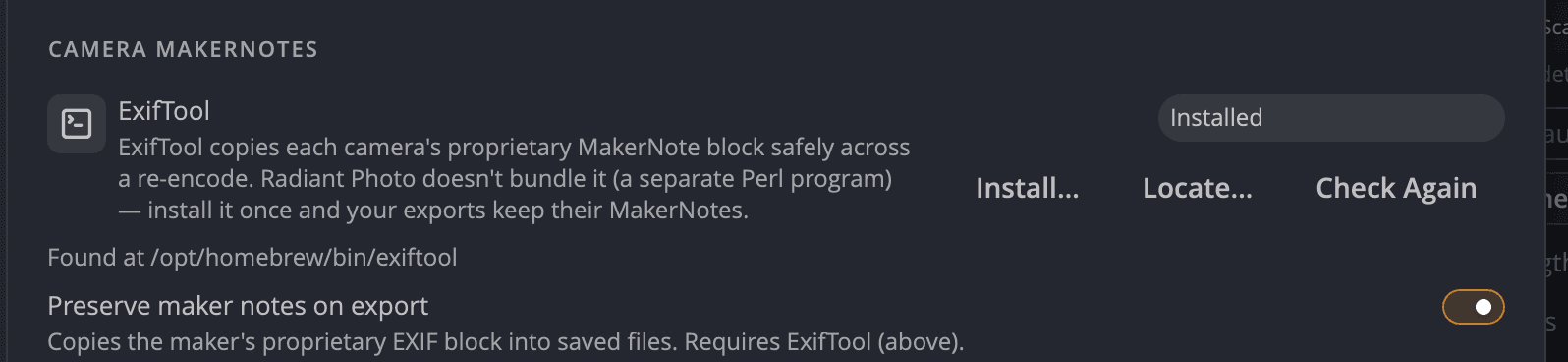
| Setting | Default | What it does |
|---|---|---|
| Preserve maker notes on export | On | Copies the camera's private block into saved files. Needs ExifTool. |
Important
On Windows, ExifTool also carries the ordinary capture metadata: EXIF, IPTC and GPS. Without it, Radiant Photo saves the photo and warns Saved … WITHOUT its camera metadata — ExifTool is not installed.
Privacy
Maker notes can include your camera's serial number. If you remove camera details with SafeShare (Remove camera info in Settings > Metadata), they are removed from saved photos too.