
Raw files and Radiant Raw
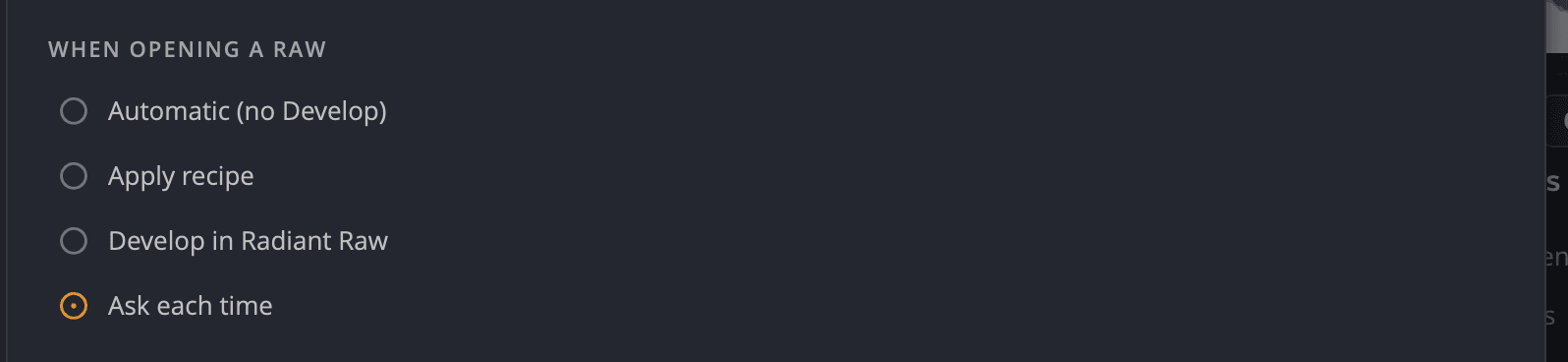
Radiant Photo opens camera raw files directly, and it can hand them to Radiant Raw when you want to develop them yourself first. You choose what happens in Settings > Raw, under When opening a Raw.
Choose what happens when you open a raw file
| Choice | What happens |
|---|---|
| Automatic (no Develop) | The raw file opens straight into the editor, rendered as shot. Nothing is asked. |
| Apply recipe | The raw file opens with a develop recipe you choose, without asking. |
| Develop in Radiant Raw | The raw file opens in Radiant Raw first. When you finish there, the developed photo comes back to Radiant Photo. |
| Ask each time | Every time you open raw files, the Open Raw dialog asks which you want. |
Until you choose, Radiant Photo picks for you. If Radiant Raw is installed and activated (a trial counts), you're asked each time. Otherwise raw files open with Automatic (no Develop).
You can change the choice in three places:
- Settings > Raw, under When opening a Raw.
- The Quick settings menu (the gear at the left of the toolbar), under When opening a Raw.
- Remember my choice in the Open Raw dialog.
The Open Raw dialog
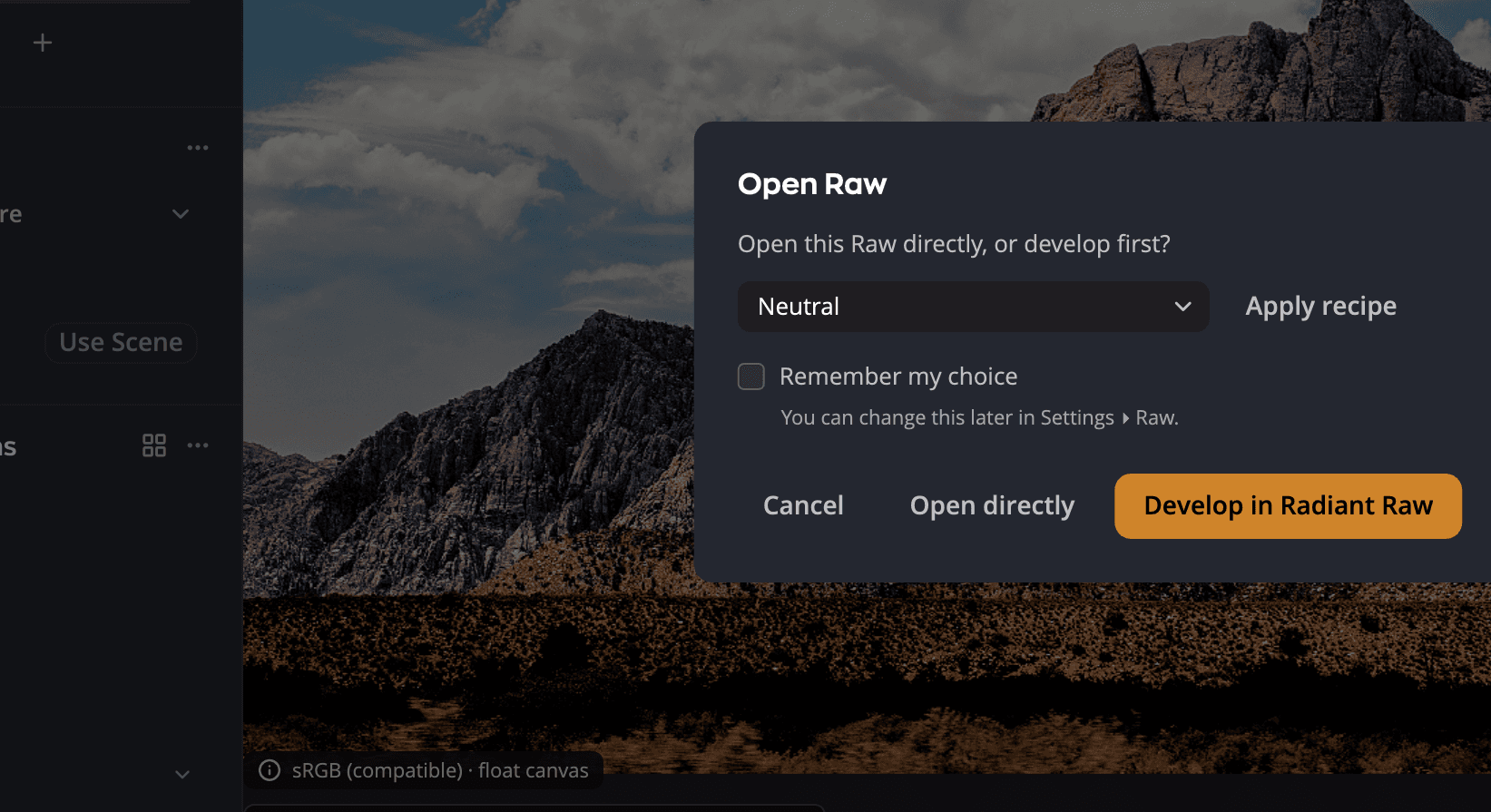
| # | Control | What it does |
|---|---|---|
| 1 | Recipe menu and Apply recipe | Opens the raw files with the recipe you pick. |
| 2 | Remember my choice | Saves your answer so you aren't asked again. You can change it later in Settings > Raw. |
| 3 | Open directly | Opens the raw files as shot, like Automatic (no Develop). |
| 4 | Develop in Radiant Raw | Sends the raw files to Radiant Raw. Shown when Radiant Raw is installed. Grayed out until it's activated. |
If some of the files you opened are not raw files, they open directly. When the raw files get a recipe or go to Radiant Raw, a message says how many other files opened directly.
Recipes
A recipe is a starting look for the raw conversion. Every recipe list in Radiant Photo shows the built-in recipes first, then your own recipes from Radiant Raw.
To choose the recipe raw files open with, go to Settings > Raw and choose Apply recipe. A Recipe section appears below, with an Apply recipe menu and Manage Recipes…. The Quick settings menu lists the recipes too, and the Open Raw dialog has its own recipe menu.
Radiant Photo includes these built-in recipes:
| Recipe | Result |
|---|---|
| Neutral | The photo as shot. |
| Automatic, Auto Color, Auto Tone | Automatic corrections for the whole photo, the color only, or the tone only. |
| Log | A flat, low-contrast rendering that keeps the most room for editing. |
| B&W, B&W Flat, B&W Noir | Black-and-white renderings. |
| Color - Vivid, Color - Warm, Color - Cool, Color - Faded | Color styles. |
Eight of them carry the Lab Tools label, because they are still being refined: Log, the three B&W recipes and the four Color recipes. The label sits beside their names in every recipe list: the Apply recipe menu, the Open Raw dialog, the Quick settings menu and Manage Recipes…. Point at it to read Still being refined. Tell us what you think. Neutral, Automatic, Auto Color and Auto Tone carry no label, and neither do your own recipes.
The built-in recipes don't need Radiant Raw. They work whether or not Radiant Raw is installed or activated.
Radiant Photo develops a raw file with a recipe in Adobe RGB (1998), the color space Radiant Raw uses too. The file is 16-bit unless you change it under Rendition in Settings > Raw. With Automatic (no Develop), a raw file opens in your editing color space instead. See Settings.
Your own recipes from Radiant Raw
Recipes you save in Radiant Raw are listed in Radiant Photo too, after the built-in ones. The two apps share one list. Radiant Photo reads it again each time it shows a recipe list, so a recipe you save, rename or delete in Radiant Raw shows up there. In the Quick settings menu, your own recipes read, for example, Landscape (custom).
Radiant Photo applies your own recipes with Radiant Raw's develop engine, without opening Radiant Raw. So they need Radiant Raw installed and activated on this computer. A trial counts. Until then they have a lock. If Radiant Raw isn't on this computer, picking one does nothing, and a raw file set to open with one opens with Neutral instead.
Radiant Photo applies everything in your recipe except a Look and lens corrections. If the recipe was saved with an Auto, the Auto isn't run again for each photo. Only Radiant Raw itself does those. To get the whole recipe, choose Develop in Radiant Raw and apply the recipe there.
If the recipe that Apply recipe uses is renamed or deleted in Radiant Raw, raw files open with Neutral until you choose another.
Manage Recipes
In Settings > Raw, under the Apply recipe menu, click Manage Recipes…. The Recipes window lists Built-in Recipes and My recipes, the same raw recipes Radiant Raw shows. The recipes on the left panel's Recipes tab aren't here (see Recipes).
Click a recipe to make it the one raw files open with. For more, click its More options (…) button or right-click it:
| Choice | What it does |
|---|---|
| Apply recipe | Makes it the recipe raw files open with. Grayed out on a recipe with a lock. |
| Duplicate | Adds a copy to My recipes, for example Neutral copy. Works on built-in recipes too. The copy is one of your own recipes, so it needs Radiant Raw like the others. |
| Rename… | Your own recipes only. A built-in recipe's name is refused: A built-in recipe has that name. Choose another. If one of your recipes already has the name, you're asked Replace “Landscape”? first. |
| Delete… | Your own recipes only. You're asked Delete recipe? first. |
Each change is saved right away to the list the two apps share. If you rename the recipe raw files open with, Radiant Photo keeps using it under its new name. Click Done to close the window.
Develop in Radiant Raw
Radiant Raw is a separate app for raw development, with its own license. Radiant Photo has no develop window of its own, so the Develop in Radiant Raw choice appears only when Radiant Raw is on this computer.
| Radiant Raw is… | What you see in Settings > Raw |
|---|---|
| Not installed | Learn about Radiant Raw, a link to its web page. |
| Installed but not activated | Develop in Radiant Raw with a lock and Not activated, and Activate Radiant Raw, which opens Radiant Raw. |
| Installed and activated | Develop in Radiant Raw, ready to use. A trial counts. |
While Radiant Raw works on a photo, Radiant Photo shows Developing in Radiant Raw…. The developed photo then opens in the editor. It comes back as a 16-bit TIFF in Adobe RGB (1998).
Sometimes a photo you developed in Radiant Raw opens another way, for example with Automatic (no Develop) or a recipe. Then a note says Developed in Radiant Raw. It means what you see is not your Radiant Raw develop.
To develop a raw file again, open the thumbnail's menu in the filmstrip and choose Develop Raw…. For a photo you already developed, the item reads Re-develop Raw….
Note
Radiant Raw can change the framing of a photo. When it does, Radiant Photo removes its own crop and rotation from that photo, and tells you. Spot Removal spots move with the photo's content, and a spot that lands entirely outside the new frame is removed. If the spots can't be moved, they're all removed, and you're told.
If Radiant Raw isn't activated
Radiant Raw needs its own activation. Activating Radiant Photo doesn't activate it. Until Radiant Raw is activated on this computer, or after its trial or license ends:
- Develop in Radiant Raw has a lock in Settings > Raw and in the Quick settings menu. Choosing it opens Radiant Raw so you can activate it there.
- In the Open Raw dialog, Develop in Radiant Raw is grayed out. A line under the recipe menu says Not activated, with Activate Radiant Raw. Open directly is the default button.
- If you chose Develop in Radiant Raw earlier, raw files open with Automatic (no Develop) instead. A message says Radiant Raw isn't activated on this Mac. (on Windows, Radiant Raw isn't activated on this PC.). It shows once until you quit Radiant Photo. Your choice is kept for later.
- Develop Raw… and Re-develop Raw… in the filmstrip show the same message, and the photo stays as it is.
- Your own recipes have a lock. Picking one in a recipe menu opens Radiant Raw so you can activate it. If Apply recipe uses one of them, raw files open with Neutral instead, with the same message.
Click Activate Radiant Raw in the message to open Radiant Raw and activate it. When you switch back to Radiant Photo, it sees the activation. You don't need to restart.
Which raw files open
Radiant Photo reads most camera raw formats, including .arw, .cr2, .cr3, .nef, .orf, .raf, .rw2 and
.dng. Hasselblad .3fr and .fff files open through your operating system's own raw support: on Windows that
needs Microsoft's free Raw Image Extension.
Tip
Already develop raw files in another app? Save a 16-bit TIFF there and open that in Radiant Photo. See Opening photos.