
Skin
The Skin tools smooth skin, remove blemishes and tone down shine, while keeping hair, eyes and fine detail sharp. You'll find Skin in the right panel, below Face (press S).
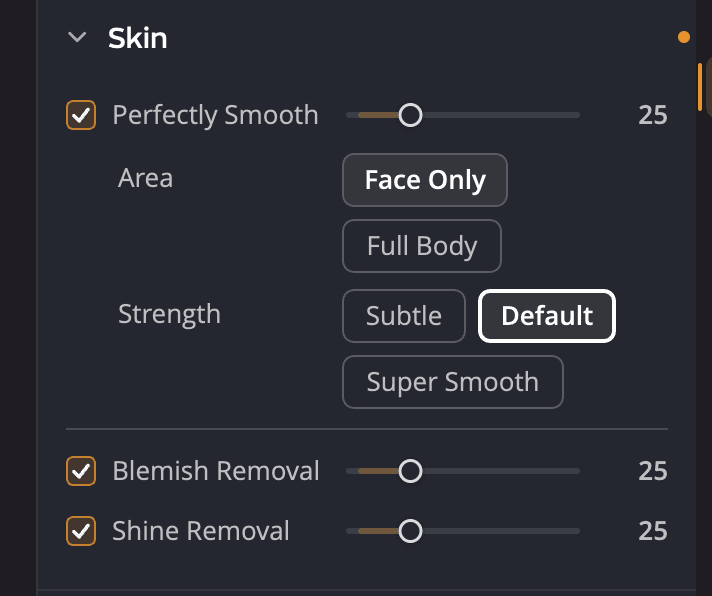
| # | Control | Range (default) | What it does |
|---|---|---|---|
| 1 | Perfectly Smooth | 0 to 100 (25) | Smooths skin and softens wrinkles. |
| 2 | Area | Face Only, Full Body | Which skin Perfectly Smooth works on. |
| 3 | Strength | Subtle, Default, Super Smooth | How smooth the result is. |
| 4 | Blemish Removal | 0 to 100 (25) | Removes blemishes and spots with a local fix. |
| 5 | Shine Removal | 0 to 100 (25) | Tones down shiny skin from flash or bright light. |
Dragging a slider turns its tool on. Double-click a slider to put it back at its default.
Note
Skin is the portrait retouching section. To correct the color of skin, use Skin Tone instead. See Skin Tone.
Smooth skin
Perfectly Smooth reduces wrinkles and uneven texture without losing detail in hair or eyes.
- Choose the Area. Face Only smooths only the faces in Face Selection. Full Body smooths all the skin it finds in the photo, such as arms and shoulders.
- Choose a Strength:
- Subtle smooths in a very realistic, gentle way.
- Default softens wrinkles and keeps detail in hair and eyes.
- Super Smooth smooths even more, but some fine detail can be lost.
- Adjust the slider while you look at the skin at 100%.

Tip
Smooth skin looks best when you can still see its texture. If the face starts to look plastic, lower the slider or switch to Subtle.
Remove blemishes
Blemish Removal looks for blemishes, spots and small marks on the skin and corrects each one where it is. The skin around a blemish is left alone, so the result doesn't look blurred.
For a single mark the tool misses, or anything that isn't skin, use Spot Removal. See Spot Removal.
Remove shine
Shine Removal tones down the bright sheen that flash or strong light leaves on oily skin, often on the forehead, nose and cheeks.
Turn Skin off, or reset it
Click the eye icon in the Skin header to turn the section off and compare. The header's reset button (Reset Skin) puts the section back to its starting state. That state has Perfectly Smooth on at 25 with Full Body and Default, and Blemish Removal and Shine Removal off.
Perfectly Smooth, Blemish Removal and Shine Removal also follow the Portrait slider at the top of Face. See Portrait tools.